AbdulTech
  • Home
  • Business
    • Internet
    • Market
    • Stock
  • Downloads
    • Dvd
    • Games
    • Software
      • Office
  • Parent Category
    • Child Category 1
      • Sub Child Category 1
      • Sub Child Category 2
      • Sub Child Category 3
    • Child Category 2
    • Child Category 3
    • Child Category 4
  • Featured
  • Health
    • Childcare
    • Doctors
  • Uncategorized

Monday, 24 April 2017

Airtel Finally Rolls Out 4G LTE Service In Nigeria

 Abdul     April 24, 2017     airtel, network     No comments   

Airtel Finally Rolls Out 4G LTE Service In Nigeria

After all the networks in Nigeria; Etisalat, Glo and MTN had successfully rolled out their 4G LTE service to their users in 2016, Airtel decided to launch the superfast network 4G LTE smartphone to its users in Nigeria to
improve browsing speed of the internet.
Airtel 4G LTE
The Managing Director, Airtel Nigeria, Mr Segun Ogunsanya, said on Saturday that the telecommunication company partnered with ZTE, a Chinese multinational telecommunications equipment/systems company to launch or roll out 4G (fourth generation) wireless mobile telecommunications technology in Nigeria.
Even in 2012, Airtel was the first telecommunications operator company in Nigeria to complete a successful 4G trial in Lagos.
He said this is in line with the company commitment to explore innovation and lead a mobile internet revolution in Nigeria.
So, if your smartphone supports of compatible with 4G LTE and it’s band, you will be able to see 4G LTE service in your phone while using Airtel network.
What do you have to say about this?
source: punchng
Read More
  • Share This:  
  •  Facebook
  •  Twitter
  •  Google+
  •  Stumble
  •  Digg

Sunday, 23 April 2017

Get 4x Bonus On Any Amount You Recharge With Glo 4x Formula Recharge

 Abdul     April 23, 2017     glo, network     No comments   

Get 4x Bonus On Any Amount You Recharge With Glo 4x Formula Recharge

This is good news for all Glo subscribers as Glo introduced a new package they call Glo 4x Fomula Recharge.  To enjoy this amazing offer from them, all you need to do first is to
migrate to Glo Fomular, this Offer rewards Glo customers with four times the value of all recharges made from N100 and above.

Glo 4x bonuses - AbdulTech Blog

The airtime is valid from14days to 30days depending on the amount you recharge. This new Glo 4X Bonus offer is available to all new and existing customers.

How Does Glo 4x Formula Recharge Work?

Below is an example of how and what you’ll enjoy if you migrate or start using Glo 4x Formula Recharge Package:
  1. If you recharge with N100, you will get a total of N400 i.e. N100 recharge value + N300 bonus airtime
  2. If you recharge with N500, you will get a total of N2,000 i.e. N500 recharge value + N1,500 bonus airtime
  3. If you recharge with N1,000, you will get a total of N4,000 i.e. N1,000 recharge value + N3,000 bonus airtime
Glo 4x bonuses - AbdulTech Blog

How Do I Migrate To Glo 4x Formula Recharge Package

  • To enjoy this amazing offer, whenever you want to recharge simply dial *323*RechargePIN#.
  •  You can easily check your 4X Bonus balance by dialing #122*30#

Please Note

  • You can accumulate this bonus as you want by recharging with *323*Pin#
  • You can use the bonus credit to call all networks locally and internationally.
  • You can also browse and send SMS wit the Bonus Credit.
  • You can’t transfer your 4x Recharge Bonus.
  • And The Call Rate charged at 45k/sec To All Networks

I hope this post helps?
Read More
  • Share This:  
  •  Facebook
  •  Twitter
  •  Google+
  •  Stumble
  •  Digg

Gionee M6S Plus scheduled to Launch on April 24

 Abdul     April 23, 2017     phone     No comments   

Gionee M6S Plus scheduled to Launch on April 24

Gionee M6s - AbdulTech Blog
Gionee has set to unveil another powerful device, a successor to Gionee M6 and M6 plus. Gionee M6 and M6 plus were released towards the end of of last year with crazy
battery life. The Gionee M6 and M6 Plus stood the test of time because of the security encryption chip added to it.
The Chinese phone maker,  Gionee is preparing to make a major announcement of another M6 model, the coming soon device named Gionee M6S Plus. The press invite for the M6S Plus leaked recently and reveals that the device would be launched on April 24th in Beijing. Though no specification is given aside of the fingerprint ID sighted on the invite pack.
Gionee m6s - AbdulTech BlogGionee m6s - AbdulTech Blog
The M6S Plus is likely to come with a similar built-in security encryption which made its debut on the M6. There is likely going to be several other upgrades but we don’t know what other upgrades the device would have or even whether the design would see some changes.
The upgrades might be in the processor aspect since the M6 featured an Helio P10 chip. The RAM size could also be increased to 6GB as against the 4GB RAM on the M6 Plus. But we don’t see an increase in the mammoth 6,020mAh battery that is on board the device. We can’t also say if the camera sensors would be upgraded but we know that a new monster device will be added to Gionee table on the April 24th 2017.
The real images and specifications of the Gionee M6S Plus will be communicated to you as soon as we get the naked truth.
Read More
  • Share This:  
  •  Facebook
  •  Twitter
  •  Google+
  •  Stumble
  •  Digg

Friday, 21 April 2017

Reasons Why Your Smartphone Overheats And How To Fix It

 Abdul     April 21, 2017     How To, phone     No comments   

Reasons Why Your Smartphone Overheats And How To Fix It

Someone asked me sometime ago why his smartphone overheats constantly even to the extent of making it uncomfortable to hold on the palms, this is not the first time some persons are getting worried.

About this issue and after stumbling on similar topic online this morning, I think it’s time to reveal the major causes of this overheating problem and solutions to fix them.

Reasons Why Smart Phone Overheats and Solution  - AbdulTech
Sometimes, we notice our phones gets hotter than usual and the funny part is most smartphone users are acquainted to it and now see it as a norm for a phone to be very hot while in use. Don’t get it twisted, on a normal circumstance, a smartphone should be hot while in use but it shouldn’t be too hot to the extent of making the user uncomfortable. So without wasting much time, let’s see the causes and solutions to smartphone overheating problems.

REASONS WHY SMARTPHONE OVERHEATS AND SOLUTIONS

1. Battery Problems

One of the major reasons why smartphones heat up is from the battery; some phones uses fake batteries and this is detrimental and can even result to explosion as we saw on the Samsung Galaxy Note 7 last year. For the solution, you can check the battery status by dialing *#*#4636#*#* for information on your phone. If you see anything other than “good” in the section labeled “Battery Status”, you might need to change your battery.
Also, some smartphones normally heat up while charging especially phones that supports fast charging and using the phone during charging. To fix this, don’t use your phone while charging and if it’s getting too hot, turn off “fast charging mode” (if the option is available on your phone)

2. Faulty and Fake Chargers

Your charger could be the cause of your phone getting overheated during charging, if your phone gets too hot at the port area while charging, my dear, the charger is faulty. For the solution, try replacing the USB chord but if the overheating persists, replace the charger entirely with an original company specified charger.

3. Heavy Apps/Games

Show me a hard-core gamer and I will tell you how his or her phone gets hot😀. The truth is some apps and games use up a lot of processing power while you use them. If you use these apps over a long period of time, your smartphone will overheat. If it happens only when you use these apps, then don’t worry. You just need to close the app and let the device rest for a while.

4. Virus and Infected Apps

Have you ever installed an app and after that, you start seeing different annoying ads popups? You are not alone because it happens to many smartphone users. Some of the apps that behaves like that are actually infected apps, while some are dangerous viruses and Malware that can even damage your phone. Some phone apps are just badly designed. If you install an app and shortly after, your smartphone begins to overheat, there is a possibility that app is responsible for it. The solution is to quickly uninstall the app. You can also check out this Antivirus app to clean your phone of malicious attacks from playstore.

5. Factory Fault

Some overheating is due to a factory fault in the device. A good example is the case of Samsung Galaxy Note 7 which was overheating and exploding last year after it was launched but was later recalled by the South Korean company. Meanwhile, if you just bought your phone and noticed it gets too hot, kindly go to the vendor or manufacturer and replace it. You can also take the smartphone to an authorized service center to have it fixed

6. Overusing

It’s true that smartphone is fun to use, no one want to miss out on the latest happenings online and we always play games and watch videos with our phone but this activities makes the phone heat up. I mean, phones needs rest or don’t you think it gets angry when you don’t give it the rest it deserves? So in a bombshell, if your phone gets too hot while in use, just drop it for some minutes or few hours.

7. Hot Environment

Also, avoid leaving your smartphone in hot conditions e.g. on car dashboards or near ovens. I personally noticed this whenever I travel a long distance as my phones seems to get hotter than when I’m at home. Also when the weather is hot, the phone responds by getting hot as well. So the best solution is to use the phone in a cool or not-so-hot environment. Avoid dropping the phone on car dashboard or similar places.
Yes guys, those are the main reasons, causes and fixes for smartphones that overheats. I hope you find this article interesting so please kindly help me SHARE this post on Facebook, WhatsApp, Twitter etc by hitting the share buttons below. Don’t forget to drop a comment if you have experienced any of the overheating issues on your phone. 
                                                                                                                                  Thank you.
Read More
  • Share This:  
  •  Facebook
  •  Twitter
  •  Google+
  •  Stumble
  •  Digg

Gravity Z1 – First Nigeria-Made Smartphone To Be Launched

 Abdul     April 21, 2017     phone     No comments   

Gravity Z1 – First Nigeria-Made Smartphone To Be Launched

First Nigeria Made Smartphone
It’s a very great and surprising news for Nigeria to launch their first made smartphone with classic specifications and features. Yea!
Technology is advancing everyday but it’s hard to see Nigerians participating in Technology world but their start up will really be a great surprise for all Nigerians and a technological breakthrough – Thanks to AfriOne.
AfriOne limited will on Friday launch the Gravity Z1 smartphones and other consumer devices for Nigeria’s 170 million strong populous. This marks the availability of the first in country produced smartphones for sale in Nigeria marketplace.

AfriOne models products that utilise cutting-edge technology, reflect a modern, sleek design and lots more – hence, their motto is “AfriOne – one for everyone” and they offer feature-rich products and technological load of products to connect all Nigerians.
Source: t.Guardianng

What do you have to say about the latest Made in Nigeria smartphone?

Read More
  • Share This:  
  •  Facebook
  •  Twitter
  •  Google+
  •  Stumble
  •  Digg

Thursday, 20 April 2017

BRT Buses Now Equipped With Free Public Wi-Fi

 Abdul     April 20, 2017     internet & data     No comments   

I think it’s now time for everyone to start using BRT buses in Lagos state for transport because is now equipped with free public WiFi with

fabulous and extraordinary speed that can turn on your phone Apps in one second just like 4G, if the Wi-Fi is to be compared.

As I was surfing through the internet today, a guy said he entered a blue BRT bus in Lagos and there was free public Wi-Fi which he did enjoyed by connecting easily to it. See the screenshot of the free Wi-Fi and it’s speed measured below;
brt busses wifi

speedtest

So, if you are in Lagos, you can now enjoy free Wi-Fi on BRT buses and once you observe that your data has finished, you should board a BRT bus and enjoy unlimited free data till mama call. Thanks to Lagos state government for that feature.

OH BRT HERE I COME!

What do you have to say about this?

Read More
  • Share This:  
  •  Facebook
  •  Twitter
  •  Google+
  •  Stumble
  •  Digg

Wednesday, 19 April 2017

Instagram For Android Now Works On Offline Mode

 Abdul     April 19, 2017     apps     No comments   

Normally, Instagram app for Android users doesn’t work on offline mode but rather disconnect once your data is
off or Wi-Fi cut. It is annoying and it most definitely interrupts your activities. So, the good news for all Instagram Android users is that you can now browse without using data and if you are an ardent or avid Instagram user, being offline will no longer be an issue to you.
instagram
At F8 conference today in San Jose, Facebook announced to give Instagram users offline mode feature in order for Instagram Android users to access the app without using data which means you will be able to see content that was previously loaded on Instagram’s feed, unfollow users, save media, leave comment on post, like post and all these will be applied once your connection is restored. Just like Facebook and WhatsApp.
However, this feature is only available for Android users and Instagram promised to explore for iOS users to receive similar update in the future.
What do you have to say about the new offline mode feature of Instagram?
Read More
  • Share This:  
  •  Facebook
  •  Twitter
  •  Google+
  •  Stumble
  •  Digg

YouTube Flex: Get 500MB For ₦200 and 100MB for ₦100 On Airtel

 Abdul     April 19, 2017     Browsing cheats, internet & data     No comments   

YouTube Flex is the latest data package from Airtel Nigeria. As it is titled, the plan is mainly for streaming videos on the YouTube. The Airtel YouTube
Flex comes in two packages: Weekly and Monthly plan. The weekly plan is 150MB and it cost N100 while the Monthly plan is 500MB and it cost N200.
airtel youtube flex
The plan is designed to work for YouTube streaming only. Now the question is, how can I use the data for accessing other websites? Just don’t worry, we have a means for you, thanks to VPN tunnel apps, most especially, the Psiphon modded versions.
To Activate Airtel YouTube Flex Data
  • Simply dial *141*4# and select from the pop up option on your screen
  • Select 1 to activate the Weekly plan of 150MB for N100
  • Select 2 to activate the Monthly plan of 500MB for N200
Now that you have activated the data package then you will be granted access to stream YouTube videos.
NB: This is not a huge data which you can use to streaming on YouTube the way you like. 500MB may not even enough to watch a film on YouTube, since it’s had enough validity period, I suggest you use it judiciously like browsing and chatting, that we really save the data.
To achieve this, you need Psiphon VPN.
Psiphon Settings For Airtel YouTube Flex
Once you have downloaded any of the aforementioned VPN, apply the below settings.
Set your phone APN to the default.
Launch your Psiphon, in the handler menu:
» Tick Remove Port
» Proxy Type: Real Host
» Custom Header: X-Online-Host
» Proxy Server: m.youtube.com
» Real Proxy Type: Default
» Real Proxy Server: Leave it empty
» Real Proxy Port: 80
» Select save and click on “tunnel whole device”.
» Click on the option tab
» Region: select, USA or United Kingdom
Go back to your Psiphon Home page and Click on Start.
It will take a few seconds to connect. After it gets connected then you can visit any website on any browser. You can also enjoy it on your PC via tethering.
Enjoy!
Read More
  • Share This:  
  •  Facebook
  •  Twitter
  •  Google+
  •  Stumble
  •  Digg

Monday, 17 April 2017

How To Share Any Apk Files Through Whatsapp

 Abdul     April 17, 2017     apps, whatsapp     1 comment   

WhatsApp which is one of the best social medias with the most active daily users has not yet released the sharing feature for sending Apk files but only documents sharing are enabled for now. So, in this tutorial, you will be able to easily share any Apk files to your friends and neighbours.
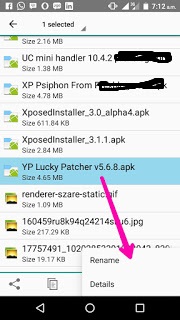
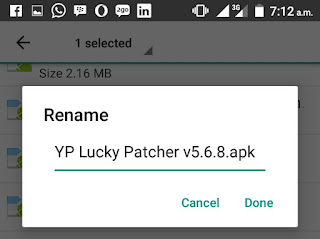
In this method or concept, you will rename any Apk files to .txt files before sending and the receiver will rename it from .txt file format to Apk file format before install. So, let's go on.

  • Don't Miss: 21 Google Search Hacks That Will Change Your Life 

How To Share Any Apk Files On WhatsApp

As a sender


  • Firstly, open your WhatsApp application and go to the person's private message to send the Apk files or in a WhatsApp group (it depend on your choice).
  • Then, open your phone file manager and locate the Apk file you want to send then, hold to bring the options for RENAME. You can now rename the .apk to .txt and press OK. As shown below;
    share apk files through whatsapp  

    share apk files through whatsapp 
    Then go back to your WhatsApp application and go to the person's profile then tap on the Sharing icon and tap on Document. Now, locate the renamed file and send.
Now As a receiver:


  • Open your WhatsApp application and download the shared Apk application.
  • Then, goto your phone file manager and locate the shared Apk file and hold it to bring out options to RENAME the app from .txt to .apk and immediately, you can now tap it to install.
 
  • Wow! That's all.


This is best method to share any Apk file on WhatsApp application before they decides to add the sharing of app features on their app.

Is it helpful? Do you encounter any problems or issues while trying to set this up, kindly ask more questions and if it works for you, kindly share your experience! 
Read More
  • Share This:  
  •  Facebook
  •  Twitter
  •  Google+
  •  Stumble
  •  Digg

21 Google Search Hacks That Will Change Your Life

 Abdul     April 17, 2017     Hacks, Web tutorials     5 comments   

Here are some fun things and some useful things that you maybe didn't know you could do with Google search.   As you know that AbdulTech brings more good Hacks to you everyday.


1. Use Google as a timer:

Just type 'Set timer 30 minutes' (or however long you want) in quotes, and the countdown begins!
Via quora.com
Just type "Set timer 30 minutes" (or however long you want) in quotes, and the countdown begins!

2. Google will calculate your tip for you:

Type 'tip calculator,' and a tip calculator will magically appear and do your bidding.
Via quora.com
Type "tip calculator," and a tip calculator will magically appear and do your bidding.

3. Search for special days:

Type in an important upcoming day and Google will automatically provide you with the date it's occurring on and a brief description of what it's all about. Saint Swithin's Day is coming up, you guys!
Via quora.com
Type in an important upcoming day and Google will automatically provide you with the date it's occurring on and a brief description of what it's all about. Saint Swithin's Day is coming up, you guys!

4. You can also use the same method to get movie release dates...

Via quora.com

5. A full schedule for your favorite shows...

Via quora.com

6. Songs by your favorite bands...

Via quora.com

7. And a list of books by your favorite authors:

Via quora.com

8. You can also get quick flight schedules:

Via quora.com

9. The exact time of the sunrise in your city:

Via quora.com

10. Info on a company's founders:

Via quora.com

11. Help with your geometry homework:

12. You can tell Google to do a barrel roll:

13. Or tilt, ever so slightly, to the right:

Via quora.com

14. Searching for "recursion" will get you into a dangerous infinite loop:

Via quora.com

15. And searching "Anagram" will get you some nifty anagrams you can use to impress all your friends:

Via quora.com

16. A "Festivus" search brings up a beautiful aluminum Festivus pole:

Via quora.com

17. "Binary" and "hexadecimal" take you directly into the land of the nerds:

Via quora.com

18. And while you're there, you may as well try Googling "Zerg Rush":

You can actually play this game: Click as fast as you can on the O's as they attack your screen to save your search results from the Zerg.

19. Google will also show you the etymology of certain words...

Via quora.com

20. A calorie comparison of your favorite foods...

Via quora.com

21. Or you can go back to a happier time:

Just type 'Google in 1998' in the search bar and you can search Google as if you were back in the glorious '90s.
Via quora.com
Just type "Google in 1998" in the search bar and you can search Google as if you were back in the glorious '90s.

Is it helpful? what do you think about these amazing features?
Read More
  • Share This:  
  •  Facebook
  •  Twitter
  •  Google+
  •  Stumble
  •  Digg
Newer Posts Older Posts Home

Popular Posts

  • Upgrade Your Tecno Y4 To 6.0 Marshmallow Using Mystic OS V7 Custom ROM
    Do you know that you can upgrade your  Tecno Y4  to 6.0 Marshmallow? Yea! You can do that easily with this tutorial and by installing  Mysti...
  • How To Activate BB Plan Of 3GB For 1,000Naira On Android Device
    Airtel has joined the best network that offers cheaper data plans even on BlackBerry phone because it refused to join other networks like Et...
  • FIFA 14 v1.3.6 Mod Apk + Obb Data [No Root] Download, Install And Play [Fully Unlock]
    EA Sport Android FIFA 14 has been the best Android football HD game so far due to its HD graphics, realness, offline feature to enjoy manage...
  • OnePlus 5T ‘Star Wars Edition’ Has Been Launched In India
    A month after the dispatch of the OnePlus 5T , OnePlus indeed took the middle stage to report the dispatch of the new Star Wars-enlivened...
  • How To Transfer Credit Or Airtime On Etisalat, MTN, Glo And Airtel Network
    Are you looking for a way to transfer credit or Airtime on  Glo, Etisalat, MTN  and  Airtel  networks? Yea! You can do that with just an eas...

Categories

airtel android apple apps blogging Browsing cheats computer etisalat games glo google pixel Hacks How To infinix internet internet & data internet data ios mod mtn network oneplus oneplus 5t oneplus5t star wars oreo pc phone premium accounts Ram Roms samsung star wars tecno telegram tweakware wallpapers Web tutorials whatsapp

Newsletter

Subscribe Our Newsletter

Enter your email address below to subscribe to our AbdulTech newsletter.

About Us

AbdulTech

Vanice is modern magazine blogger template which focuses on lifestyle news, health, and entertainment.

Pages

  • Home
  • About Us
  • Disclaimer
  • Sponsor A Post
  • Contact Us
  • Write For Us
  • Advertise With US

Blog Archive

  • ▼  2019 (1)
    • ▼  January (1)
      • Download Brawl Stars APK Latest December Update
  • ►  2018 (12)
    • ►  December (1)
    • ►  October (4)
    • ►  August (3)
    • ►  June (1)
    • ►  April (3)
  • ►  2017 (173)
    • ►  December (3)
    • ►  August (3)
    • ►  July (8)
    • ►  June (6)
    • ►  May (7)
    • ►  April (40)
    • ►  March (49)
    • ►  February (57)

Copyright © AbdulTech | Powered by Blogger
Design by Hardeep Asrani | Blogger Theme by NewBloggerThemes.com | Distributed By Gooyaabi Templates