AbdulTech
  • Home
  • Business
    • Internet
    • Market
    • Stock
  • Downloads
    • Dvd
    • Games
    • Software
      • Office
  • Parent Category
    • Child Category 1
      • Sub Child Category 1
      • Sub Child Category 2
      • Sub Child Category 3
    • Child Category 2
    • Child Category 3
    • Child Category 4
  • Featured
  • Health
    • Childcare
    • Doctors
  • Uncategorized
Showing posts with label glo. Show all posts

Friday, 28 April 2017

New Working Setting For Glo N0.00 Unlimited Free Browsing Via Psiphon

 Abdul     April 28, 2017     Browsing cheats, glo     No comments   

Guys, it is time to enjoy unlimited free browsing with Glo network via Psiphon vpn. The setting is not something new and you might have used it few days back before it stopped working, but with the new
settings below, you can get back on the track and start flexing unlimited with your Glo sim via Psiphon vpn.
Glo 0.0k settings

If the Glo 3G network is strong in your area, simply insert your Glo sim card into your Android device and follow the instruction below carefully to get it rolling.
» Download the Psiphon Handler vpn.
» Use the Glo default APN for your phone setting i.e APN should be glosecure and both username and password should be secure
» Now, open the inbuilt Browser or Chrome, go to hsi.glo.com 
Press green button, press continue PAYU and click on continue.
Reboot your smartphone
Launch Psiphon Handler, in the handler menu:
» Mark remove port
» Proxy type: Real host
» Proxy server: redirect.glo.com
» Real Proxy Type: HTTP
» Real Proxy Port: 80
» Hit the Save button
» Immediately you click save, a pop up message will appear requesting to use Tunnel whole device, just tap on the option to Tunnel Whole Device and it will take you to the next phase
» Choose the Option Menu
» Under this Option menu, you will see Select Region, tap and select USA
» Go to your More Option settings and untick connect through HTTP Proxy
» Go back now to the main page of the Psiphon and tap the start button below, wait for few seconds for it to Connect. Then, fire up any browser and any other apps.
If your connection not stable, kindly connect your terminal emulator to make it stable. Download terminal emulator here.
Open the app, press any letter, then clean the letter and press ping 127.0.0.1, press enter. Make sure you connect your Psiphon before open the terminal emulator.
That is all.  
Here is another working setting, if the first one doesn’t work for you, try this;
APN Settings, set it as follows;
» Apn: Gloflat» Proxy: 127.0.0.1
» Port: 8080
Launch Psiphon Handler, in the handler menu:
» Font query: http://german-proxy.de 
» Remove Port: Tick or untick» Proxy type: RealHost» Proxy Server: http://german-proxy.de» Port: 80» Real Proxy Type: Default
» Hit the Save button
» Immediately you click save, a pop up message will appear requesting to use Tunnel whole device, just tap on the option to Tunnel Whole Device and it will take you to the next phase
» Choose the Option Menu
» Under this Option menu, you will see Select Region, tap and select USA
» Go to your More Option settings and untick connect through HTTP Proxy
» Go back now to the main page of the Psiphon and tap the start button below, wait for few seconds for it to Connect. Then, fire up any browser and any other apps.
Enjoy it while it last.
Read More
  • Share This:  
  •  Facebook
  •  Twitter
  •  Google+
  •  Stumble
  •  Digg

Glo Reduces Their Data Volume

 Abdul     April 28, 2017     glo, network     3 comments   

The grandmaster of data plan, Glo has successfully reduced their data volume. Glo are so funny, upon how their network
is slow and frustrating to their users or customers. The complaint of their customers didn’t give them the courage to fix their slow network issue but they went ahead to frustrate users the more.

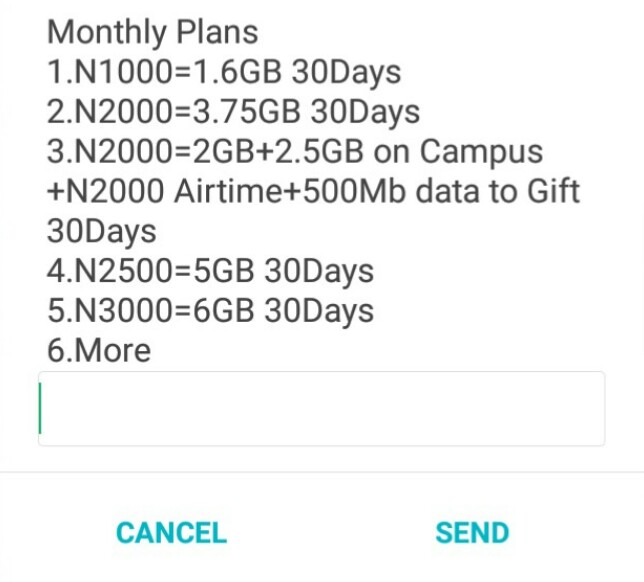
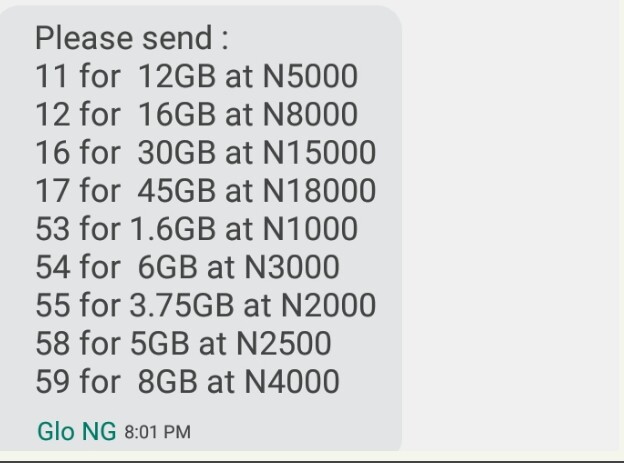
Changes in Glo Data Plans;
  • 1,000Naira now gives 1.6GB instead of 3.2GB
  • 2,000Naira now gives 3.75GB instead of 7.5GB
  • 2,500Naira now Gives 5GB instead of 10GB
  • 3,000naira now gives 6GB instead of 12GB
  • 4,000Naira now Gives 8GB instead of 18GB
  • 5,000naira now Gives 12GB instead of 24GB
  • 8,000naira now gives 16GB instead of 48GB
  • 15,000naira now gives 30GB instead of 60GB
  • 18,000naira now gives 45GB instead of 90GB
As shown below;

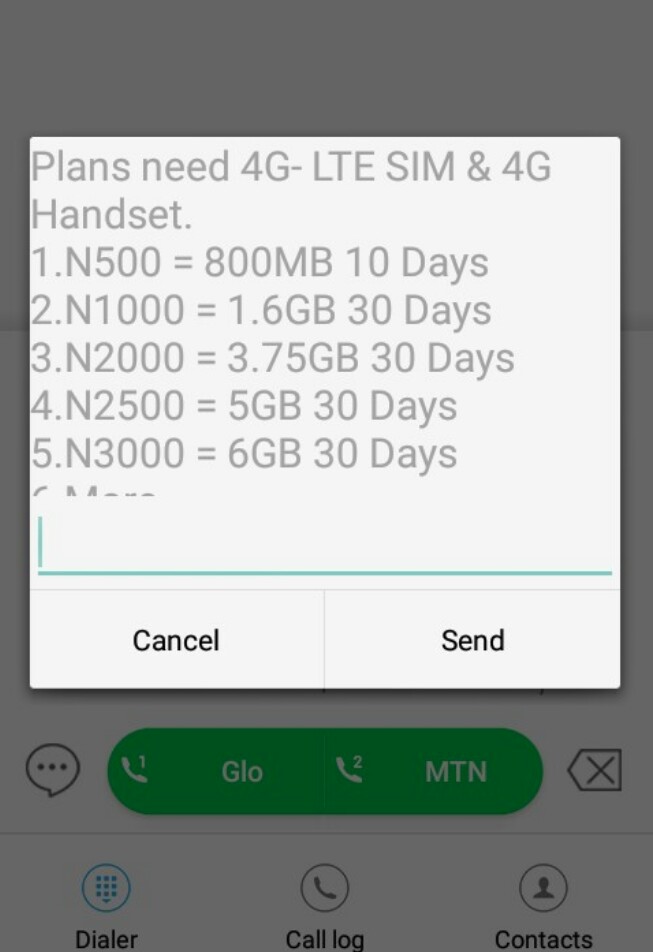
Same with their 4G LTE data plans;
So, Glo has definitely lose their crown as grandmaster of data plan even when their data plan was high, their network was a deal breaker.

What do you have to say about the Glo reduce of data volume?
Read More
  • Share This:  
  •  Facebook
  •  Twitter
  •  Google+
  •  Stumble
  •  Digg

Sunday, 23 April 2017

Get 4x Bonus On Any Amount You Recharge With Glo 4x Formula Recharge

 Abdul     April 23, 2017     glo, network     No comments   

Get 4x Bonus On Any Amount You Recharge With Glo 4x Formula Recharge

This is good news for all Glo subscribers as Glo introduced a new package they call Glo 4x Fomula Recharge.  To enjoy this amazing offer from them, all you need to do first is to
migrate to Glo Fomular, this Offer rewards Glo customers with four times the value of all recharges made from N100 and above.

Glo 4x bonuses - AbdulTech Blog

The airtime is valid from14days to 30days depending on the amount you recharge. This new Glo 4X Bonus offer is available to all new and existing customers.

How Does Glo 4x Formula Recharge Work?

Below is an example of how and what you’ll enjoy if you migrate or start using Glo 4x Formula Recharge Package:
  1. If you recharge with N100, you will get a total of N400 i.e. N100 recharge value + N300 bonus airtime
  2. If you recharge with N500, you will get a total of N2,000 i.e. N500 recharge value + N1,500 bonus airtime
  3. If you recharge with N1,000, you will get a total of N4,000 i.e. N1,000 recharge value + N3,000 bonus airtime
Glo 4x bonuses - AbdulTech Blog

How Do I Migrate To Glo 4x Formula Recharge Package

  • To enjoy this amazing offer, whenever you want to recharge simply dial *323*RechargePIN#.
  •  You can easily check your 4X Bonus balance by dialing #122*30#

Please Note

  • You can accumulate this bonus as you want by recharging with *323*Pin#
  • You can use the bonus credit to call all networks locally and internationally.
  • You can also browse and send SMS wit the Bonus Credit.
  • You can’t transfer your 4x Recharge Bonus.
  • And The Call Rate charged at 45k/sec To All Networks

I hope this post helps?
Read More
  • Share This:  
  •  Facebook
  •  Twitter
  •  Google+
  •  Stumble
  •  Digg

Wednesday, 8 March 2017

How To Borrow Credit Or Airtime From MTN,Airtel, Etisalat,And Glo

 Abdul     March 08, 2017     airtel, etisalat, glo, mtn     No comments   

Are you looking for the USSD code or SMS code to borrow credit or airtime from the best network providers in Nigeria which are MTN, Glo, Etisalat and Airtel? Yea! It is sometimes good to borrow airtime particularly when you run out of airtime or credit. So in this article, I will write about the codes to perform this action on different network providers in Nigeria.
network providers
Some people only knows about the code to borrow airtime from their network provider but what of other networks? It is must to be conversant with these codes in order to get used to the codes and when in emergency, you will be able to remember and rescue yourself out. That’s why you have to bookmark this page into your browser for reference purposes or future use, so that it will be very easy for you to open this page anytime you want to borrow credits from the network you forgot their codes.

Not only that, you might be in the case that you are cashless, or not in place to purchase airtime and has no airtime. So your next option, would be of borrowing credit or airtime from network providers.
  • Must Read: How To Cancel, Stop, Disable And Deactivate Auto Data Renewal On MTN

It is simple and easy to borrow credit or airtime. So let’s see how to do this.
How To Borrow Credit Or Airtime From Glo, MTN, Etisalat and Airtel
It is easy and simple because we will be making use of  USSD codes to the job faster.

1. How To Borrow Credit Or Airtime From Glo: Yea! to borrow credits or airtime from Glo network will require you of using a 4-digit PIN and is very easy to create. You must use Glo at least 4months before you would be eligible to borrow credit from them. Not only that, their service charge is just 10% which means if you borrow 100naira, you will be credited with 80naira while the 20naira goes to Glo and when you pay back, the 100naira will be removed.
  • So to borrow credit from Glo, you just have to dial *321# and create a 4-digit PIN of your choice e.g 2567
  • Then borrow the credit by dialing *321*pin*amount you want to borrow#. E.g *321*2567*100#.
Yea, your ordered airtime will be credited to you instantly.
2. How To Borrow Credit Or Airtime From MTN: It is easy and simple to borrow credits or airtime from MTN. This borrowing feature is only available for those who recharge 500naira monthly and their service charge is 10% which means  if you borrow 1000naira, you will be credited with 900naira while the others goes to MTN and your next recharge will be charged 1,000naira.

  • So to borrow airtime, just dial *606# and follow the on-screen to complete transaction.
  • The credit you ordered will be credited instantly.
So enjoy!

3. How To Borrow Credit Or Airtime From Etisalat: It is very easy and simple to borrow credit or airtime from Etisalat network because you only require USSD code hmmm just like others though. This borrowing of credit feature is only available to those who recharge 900naira monthly and it attracts service charge of 10% which means if you borrow 200naira, 20naira will be deducted successfully and will go to Etisalat. Your next recharge will instantly pay borrow credit of  the borrowed 200naira.
  • So to borrow airtime or credit from Etisalat, you will dial *665*Amount# e.g *665*500#.
  • Your ordered credit will be credited instantly!
Enjoy!
4. How To Borrow Credit Or Airtime From Airtel: To borrow credit or airtime from Airtel is very simple and easy (just like Etisalat method). To borrow credit will attract 10% charges from Airtel which means when you load 200naira, you will be charged 20naira and given 180naira. On your next recharge, will pay the borrowed airtime. To be qualified for this service on airtel, you will have to recharge at least 250naira monthly and must be a consistent subscribers for at least 3months.
  • To borrow credit on airtel, just dial *500*Amount#. For example, *500*1000# to borrow 1,000naira.
  • Your ordered airtime will be credited instantly.
So enjoy!
With these ways to Borrow Airtime and Credit On MTN, Glo, Etisalat and Airtel, will always help you on daily basis. So you can learn the codes.
 
Is it helpful? Do you encounter any problems or issues while trying to set this up, kindly ask more questions and if it works for you, kindly share your experience!
Read More
  • Share This:  
  •  Facebook
  •  Twitter
  •  Google+
  •  Stumble
  •  Digg

Etisalat and Glo Free Browsing Cheat Via Stark VPN on Android

 Abdul     March 08, 2017     etisalat, glo, internet & data     3 comments   

GLO unlimited And Etisalat 60MB daily are blazing via Stark VPN, Talking about Glo cheat, it is no more a new stuff as Glo refuses to block it even after it’s gone viral almost everywhere. Maybe because of their poor 3g network in most areas. I can’t just tell but everything is working for the benefit of someone like you that enjoys surfing and downloading stuffs free of charge.
stark vpn
Like I said earlier, the glo browsing cheat is unlimited and if you are fortunate enough to have a strong or stable Glo 3G network in your location, my dear you are on top of the world because it’s free browsing 24/7. So why not grab this opportunity to enjoy awoof.

Meanwhile, Etisalat 60mb cheat is still blazing but its limitation is the data limit of just 60MB for a day. It might be the reason Etisalat ignored or haven’t noticed it but be it as it may, 60mb is still better than non. It can help you read stuffs online, chat with your friends on WhatsApp, Messenger, BBM etc. So it’s another alternative free browsing solution and I will be recalling your mind on how to use them with one of the easiest and simplest free Internet browsing app known as Stark VPN.
HOW CAN I DOWNLOAD IT?
Download Stark VPN Apk Here
GLO FREE BROWSING WITH STARK VPN
REQUIREMENTS
✔ You need a Glo SIM card with 0.00 balance and no data
✔ Strong 3G network
✔ Your Android phone
✔ Stark vpn app
APN SETTINGS
✔ Name: AbdulTech
✔ APN: gloflat
✔ APN Type: Tick Default & Supl
✔ Proxy: leave it blank
✔ Port: leave it blank
✔ Username and password: leave it empty
After configuring the APN, launch the Stark VPN application and use the below settings.
✔ In the first box, select any Region of your choice.
✔ In the second box called Tweaks, select “Glo“.
✔ Now, tap the “RED” button, and wait for the VPN to connect. It will connect within 10 seconds.
That’s all. Launch your browser and start browsing. If you are fortunate to have better globacom 3g network. You are blessed.
ETISALAT FREE BROWSING WITH STARK VPN
REQUIREMENTS
✔ An Etisalat sim with 0.00 balance and no data
✔ Your Android phone
✔ Stark VPN App
APN SETTINGS
Use the default Etisalat APN settings.
✔ Now open the Stark VPN app
✔ In the first box, select any Region of your choice.
✔ In the second box called “Tweaks”, select
“Etisalat” .
✔ Now, tap the RED button, and wait for the VPN to connect. It will connect within 10seconds.
That’s all. Launch your browser and start browsing.
stark vpn
Etisalat free browsing is very fast but just 60mb usable per day. I think it should be fine for students unless you are downloading large stuffs or updating your apps, that’s when it will be too little for you. Continue enjoying these cheats while it lasts as it seems that both Globacom and Etisalat is aware but decided to leave it. Enjoy!
Are you still confused on how to browse free with your phone using the above steps? Just drop your questions via the comments box and I will attend to you. Remember to hit the SHARE buttons to share this post with your friends on social media. More free browsing cheats coming soon. Keep checking back or better still, bookmark this blog for future reference. Happy browsing!!!
Read More
  • Share This:  
  •  Facebook
  •  Twitter
  •  Google+
  •  Stumble
  •  Digg

Friday, 24 February 2017

Glo Night Plan: Get 1GB For Just 200Naira

 Abdul     February 24, 2017     glo     No comments   

Enjoy your night with Glo Night Plan! Glo is one of the best network in Nigeria and is also known as the grand master of data plans because of their affordable and cheap data plans. So their night plan will help you perform all tasks on the internet particularly, in the night. Well, Airtel still has the cheapest night plan.

It can be used to browse, surf the internet, stream videos, play online games and can also be used on PC modem, game console and other devices that has the ability or compatibility to access the internet. When you activate this data, you will only be able to use it in the night. Let's see Glo night plan.

How To Activate Glo Night Plan


  • Just recharge 200Naira on your Glo network.
    • Then go to your dialpad or phonebook.
    • Then dial *127*60# to activate Glo Night Plan of 200Naira for 1GB. 
    • After activation, you will have to wait till 12AM in the night and browse till it expires before dawn, 5AM.


    How To Use Glo Night Plan On PC

    Just activate the glo night plan on your smartphone and then remove the sim card and insert it to your PC modem and plug it to your PC then switch on your data connection and start browsing.


    Is it helpful? What do you have to say about Glo Night Plan and if it works for you, kindly share your experience!
    Read More
    • Share This:  
    •  Facebook
    •  Twitter
    •  Google+
    •  Stumble
    •  Digg

    Thursday, 23 February 2017

    How To Transfer Credit Or Airtime On Etisalat, MTN, Glo And Airtel Network

     Abdul     February 23, 2017     airtel, etisalat, glo, mtn, phone     5 comments   

    Are you looking for a way to transfer credit or Airtime on Glo, Etisalat, MTN and Airtel networks? Yea! You can do that with just an easy step with the use of USSD code or through SMS messages as well. With the help of this tutorial, you will be able to transfer credit from Glo to Glo, MTN to MTN, Etisalat to Etisalat and Airtel to Airtel. So let's see how to transfer your credit or Airtime on all these popular networks in Nigeria.

    How To Transfer Credit Or Airtime On All Networks In Nigeria


    FOR ETISALAT NETWORK: It is very easy and simple. You just have to dial *223*Pin*Amount*Phone Number# and your credit will transfered successfully. You can also transfer credit on Etisalat by going to Etisalat Service Menu in your menu list. So after you have located it, just tap on Balance transfer and enter the default pin 0000 then enter the amount and send. You can also change your default pin in the service menu.

    FOR AIRTEL NETWORK: It is easy and simple. You will need a transfer PIN which is the pin that should only be kept by you, otherwise,  people will be able to transfer your credits without your consent. So to change your transfer PIN, kindly send;

    Pin Old Pin New Pin as SMS to 432 e.g Pin 1234 9090. Airtel default pin is 1234 to 432. So after you have successfully changed your pin to what you will remember, then you can now transfer your credit by sending 2U (space) Recipient’s phone number (space) Amount (space) Pin to 432 as a text message. E.g Example: 2U 08122903773 100 1234 to 432.

    FOR GLO NETWORK: It is easy and simple. To transfer credit from one Glo sim to another, just dial *131*recipients phone number*Amount*Pin# then send. Example: *131*07053633719*100*12345# and after you filled it, it will tell you to press 1 to confirm and 2 to cancel. Default PIN is 00000.

    You can change or create new Glo ME2U transfer pin, dial *132*00000*New Pin* New Pin# then send.

    FOR MTN NETWORK - It is also easy and simple. Before you can transfer any credit on MTN network, you will have to create a secret pin which will only be known by only you in order for other people not to transfer your credits without your consent or permission.

    To Change PIN on MTN: You can change your Transfer Pin via SMS or USSD code. For SMS, send Default PIN New PIN New PIN to 777 e.g 0000 1234 1234 to 777 and for USSD code, just dial *601* default/old PIN* New PIN* New PIN# e.g *601*0000*1234*1234# and if you enter it correctly, you will receive a message that your Pin has been changed successfully.

    To Transfer Credit On MTN: You just have to send Recipient's number Amount Secret PIN to 777 as a text message e.g Transfer 08065655230 200 1234 and send it to 777  and to transfer credit on MTN using USSD, you just have to dial *600*Recipient’s phone number*amount in Naira*PIN# then press Send/Ok. If you enter it correctly, you will receive a message confirming successful transfer.

    Is it helpful? Do you encounter any problems or issues while trying to transfer credit on MTN, GLO, Etisalat and Airtel, kindly ask more questions and if it works for you, kindly share your experience!
    Read More
    • Share This:  
    •  Facebook
    •  Twitter
    •  Google+
    •  Stumble
    •  Digg
    Older Posts Home

    Popular Posts

    • Upgrade Your Tecno Y4 To 6.0 Marshmallow Using Mystic OS V7 Custom ROM
      Do you know that you can upgrade your  Tecno Y4  to 6.0 Marshmallow? Yea! You can do that easily with this tutorial and by installing  Mysti...
    • How To Activate BB Plan Of 3GB For 1,000Naira On Android Device
      Airtel has joined the best network that offers cheaper data plans even on BlackBerry phone because it refused to join other networks like Et...
    • FIFA 14 v1.3.6 Mod Apk + Obb Data [No Root] Download, Install And Play [Fully Unlock]
      EA Sport Android FIFA 14 has been the best Android football HD game so far due to its HD graphics, realness, offline feature to enjoy manage...
    • OnePlus 5T ‘Star Wars Edition’ Has Been Launched In India
      A month after the dispatch of the OnePlus 5T , OnePlus indeed took the middle stage to report the dispatch of the new Star Wars-enlivened...
    • How To Transfer Credit Or Airtime On Etisalat, MTN, Glo And Airtel Network
      Are you looking for a way to transfer credit or Airtime on  Glo, Etisalat, MTN  and  Airtel  networks? Yea! You can do that with just an eas...

    Categories

    airtel android apple apps blogging Browsing cheats computer etisalat games glo google pixel Hacks How To infinix internet internet & data internet data ios mod mtn network oneplus oneplus 5t oneplus5t star wars oreo pc phone premium accounts Ram Roms samsung star wars tecno telegram tweakware wallpapers Web tutorials whatsapp

    Newsletter

    Subscribe Our Newsletter

    Enter your email address below to subscribe to our AbdulTech newsletter.

    About Us

    AbdulTech

    Vanice is modern magazine blogger template which focuses on lifestyle news, health, and entertainment.

    Pages

    • Home
    • About Us
    • Disclaimer
    • Sponsor A Post
    • Contact Us
    • Write For Us
    • Advertise With US

    Blog Archive

    • ▼  2019 (1)
      • ▼  January (1)
        • Download Brawl Stars APK Latest December Update
    • ►  2018 (12)
      • ►  December (1)
      • ►  October (4)
      • ►  August (3)
      • ►  June (1)
      • ►  April (3)
    • ►  2017 (173)
      • ►  December (3)
      • ►  August (3)
      • ►  July (8)
      • ►  June (6)
      • ►  May (7)
      • ►  April (40)
      • ►  March (49)
      • ►  February (57)

    Copyright © AbdulTech | Powered by Blogger
    Design by Hardeep Asrani | Blogger Theme by NewBloggerThemes.com | Distributed By Gooyaabi Templates