AbdulTech
  • Home
  • Business
    • Internet
    • Market
    • Stock
  • Downloads
    • Dvd
    • Games
    • Software
      • Office
  • Parent Category
    • Child Category 1
      • Sub Child Category 1
      • Sub Child Category 2
      • Sub Child Category 3
    • Child Category 2
    • Child Category 3
    • Child Category 4
  • Featured
  • Health
    • Childcare
    • Doctors
  • Uncategorized
Showing posts with label mtn. Show all posts

Sunday, 11 June 2017

What You Should Know About MTN Quick WinD 500MB For N100

 Abdul     June 11, 2017     internet & data, mtn     No comments   

MTN Quick WinD is not another arrangement, a post has been made for it on this blog already, while the arrangement is as yet dynamic up till this minute, yet it appears to be heaps of individuals are yet to know about the arrangement. This made me move your consideration back to it.

MTN Quick WinD  is pocket friendly data subscription that offers whooping 500MB for just N100. It comes with  all the features of a regular data bundle. The plan can be used day and night without any restriction or limitation.
Features 
✓ MTN Quick WinD offers 500MB for a token of N100
✓ It can be used on Smartphones, iPhone, Windows phone, PC and any other browsing device you can think of.
✓ The data works without tunneling/vpn apps
✓ It works during the day and night
✓ Validity period of 7days or 168hours
✓ Works on selected MTN luck SIMs (Not all sim supported)
To Activate MTN Quick WinD For N100 
✓ Load your MTN sim with N100
✓ Dial *446*11*4*7*5# to subscribe.
✓ You’ll get a confirmation message upon successful subscription and 500MB will be given to you.
✓ To check your MTN Quick WinD data balance, dial *559# or *559*2#
When trying to activate, if you received a message like “Yello,your subscription to mtn quick wind has failed”. It means that the particular SIM is not supported and you need to look for another MTN sim, if you want to benefit from the offer. 
Read More
  • Share This:  
  •  Facebook
  •  Twitter
  •  Google+
  •  Stumble
  •  Digg

Sunday, 16 April 2017

New Latest Working And Valid IMEI For MTN Double Data

 Abdul     April 16, 2017     internet & data, mtn     3 comments   

I know that most of us are familiar with this offer and some of us are already enjoying it as well because MTN officially launched this offer since last year 2016 and it's a way to double it's users data plan. If you purchase any MTN official data plans, it will be doubled immediately and this has helped many users using MTN especially those who just purchased a new smartphone because they will be given this offer by using a special code.


MTN double data

What of those who have no time or sufficient money to buy a brand new smartphone? Yea! You can get the offer luckily from your message or alternatively, by tweaking a valid IMEI from an eligible smartphone.

MTN 100% double data bonus is still working perfectly, same with the 20% double data bonus offer. These valid IMEIs are always generated from an eligible or supported smartphone in order for those who are not eligible to also enjoy the offer for a period of 6 months.

So, if you are among those who have not gotten this offer, you can follow us along as we unveil the details and it's procedure. Let's go.
  • Don't Miss: How To Get Free Airtime To Subscribe And Call Using Raadaa 
Latest And Current Working IMEI For MTN Double Data


  • Tecno Y2 IMEI number - 35166408564**** 
  • Infinix Note 2 Lite IMEI number - 35455407227****
  • HG-M66 QINDAO HAIER IMEI number - 35660201757****


Just Analyze the remaining four (4) digit numbers, insert your old or new MTN sim into your Android smartphone and Tweak the IMEI number. Once your tweaking is successful, you will receive a message instantly or later, saying; "Congratulations! Your smartphone has been activated to enjoy DOUBLE on any data bundle you buy for the next 6months.".

Now, dial *131*1# to buy any MTN data plan and it will be doubled immediately which means you will be given 100% double data on that purchased data plan. Always dial *131*4# to check your data balance.

Is it helpful? Do you encounter any problems or issues while trying to activate this, kindly ask more questions and if it works for you, kindly share your experience! 
Read More
  • Share This:  
  •  Facebook
  •  Twitter
  •  Google+
  •  Stumble
  •  Digg

Thursday, 13 April 2017

MTN StartPack: Enjoy 500% Bonus On Every Recharges For 6Months

 Abdul     April 13, 2017     mtn, network     No comments   

Wow! MTN StartPack is a wonderful and special Tariff Plan that enables users enjoy Free extra 500% bonus on any of their recharges. The people who loves calling will definitely love this temporary Tariff Plan. It is only available for new MTN Sims.
It works when you recharge 100naira and above on your new registered MTN sim. Assuming, you recharged 100naira, you will get free 500naira added to the 100naira you recharged making 600naira. So, in every recharges, Free 500naira will always be added.
MTN startpack
It can be used to make calls, send SMS, browse the Internet and to get FREE 10MB in every recharges of 200naira & above with some other exciting offers.
  • Must Read: Infinix S2 Pro X522 Specifications, Features, Price

Benefits Of MTN StartPack Tariff Plan Offer
  • You get free 500% bonus on any recharges of 100naira above.
  • You get Free 10MB on every recharges of 200naira and above.
  • You can browse, call and send SMS to all networks in Nigeria with the credit.
  • You will also get some other exciting offers.
Features Of MTN StartPack Offer
  • It is only available to New MTN customers who just registered and activated their MTN sim.
  • The Free 500% bonus valids for 6months and will be received in a dedicated account.
  • The Airtime bonus valid for 7days and when recharged again, the validity period will be extended.
  • The Airtime bonus can be used to call, send SMS and browse all websites.
Note: This offer is only available to all new MTN users and once you migrate out from the Tariff Plan, you won’t be able to receive the offer anymore and each bonus lasts for 7days.
Is it helpful? What do you have to have to say about MTN StartPack Tariff Plan?
Read More
  • Share This:  
  •  Facebook
  •  Twitter
  •  Google+
  •  Stumble
  •  Digg

Wednesday, 8 March 2017

How To Borrow Credit Or Airtime From MTN,Airtel, Etisalat,And Glo

 Abdul     March 08, 2017     airtel, etisalat, glo, mtn     No comments   

Are you looking for the USSD code or SMS code to borrow credit or airtime from the best network providers in Nigeria which are MTN, Glo, Etisalat and Airtel? Yea! It is sometimes good to borrow airtime particularly when you run out of airtime or credit. So in this article, I will write about the codes to perform this action on different network providers in Nigeria.
network providers
Some people only knows about the code to borrow airtime from their network provider but what of other networks? It is must to be conversant with these codes in order to get used to the codes and when in emergency, you will be able to remember and rescue yourself out. That’s why you have to bookmark this page into your browser for reference purposes or future use, so that it will be very easy for you to open this page anytime you want to borrow credits from the network you forgot their codes.

Not only that, you might be in the case that you are cashless, or not in place to purchase airtime and has no airtime. So your next option, would be of borrowing credit or airtime from network providers.
  • Must Read: How To Cancel, Stop, Disable And Deactivate Auto Data Renewal On MTN

It is simple and easy to borrow credit or airtime. So let’s see how to do this.
How To Borrow Credit Or Airtime From Glo, MTN, Etisalat and Airtel
It is easy and simple because we will be making use of  USSD codes to the job faster.

1. How To Borrow Credit Or Airtime From Glo: Yea! to borrow credits or airtime from Glo network will require you of using a 4-digit PIN and is very easy to create. You must use Glo at least 4months before you would be eligible to borrow credit from them. Not only that, their service charge is just 10% which means if you borrow 100naira, you will be credited with 80naira while the 20naira goes to Glo and when you pay back, the 100naira will be removed.
  • So to borrow credit from Glo, you just have to dial *321# and create a 4-digit PIN of your choice e.g 2567
  • Then borrow the credit by dialing *321*pin*amount you want to borrow#. E.g *321*2567*100#.
Yea, your ordered airtime will be credited to you instantly.
2. How To Borrow Credit Or Airtime From MTN: It is easy and simple to borrow credits or airtime from MTN. This borrowing feature is only available for those who recharge 500naira monthly and their service charge is 10% which means  if you borrow 1000naira, you will be credited with 900naira while the others goes to MTN and your next recharge will be charged 1,000naira.

  • So to borrow airtime, just dial *606# and follow the on-screen to complete transaction.
  • The credit you ordered will be credited instantly.
So enjoy!

3. How To Borrow Credit Or Airtime From Etisalat: It is very easy and simple to borrow credit or airtime from Etisalat network because you only require USSD code hmmm just like others though. This borrowing of credit feature is only available to those who recharge 900naira monthly and it attracts service charge of 10% which means if you borrow 200naira, 20naira will be deducted successfully and will go to Etisalat. Your next recharge will instantly pay borrow credit of  the borrowed 200naira.
  • So to borrow airtime or credit from Etisalat, you will dial *665*Amount# e.g *665*500#.
  • Your ordered credit will be credited instantly!
Enjoy!
4. How To Borrow Credit Or Airtime From Airtel: To borrow credit or airtime from Airtel is very simple and easy (just like Etisalat method). To borrow credit will attract 10% charges from Airtel which means when you load 200naira, you will be charged 20naira and given 180naira. On your next recharge, will pay the borrowed airtime. To be qualified for this service on airtel, you will have to recharge at least 250naira monthly and must be a consistent subscribers for at least 3months.
  • To borrow credit on airtel, just dial *500*Amount#. For example, *500*1000# to borrow 1,000naira.
  • Your ordered airtime will be credited instantly.
So enjoy!
With these ways to Borrow Airtime and Credit On MTN, Glo, Etisalat and Airtel, will always help you on daily basis. So you can learn the codes.
 
Is it helpful? Do you encounter any problems or issues while trying to set this up, kindly ask more questions and if it works for you, kindly share your experience!
Read More
  • Share This:  
  •  Facebook
  •  Twitter
  •  Google+
  •  Stumble
  •  Digg

Tuesday, 7 March 2017

Xenophobia: MTN Cries Out For African Unity

 Abdul     March 07, 2017     mtn     No comments   

MTN has no option than to cry out against xenophobic attacks of Nigerians living in south Africa particularly the living and business. This act has gathered several criticism globally from organizations, individuals and countries. This xenophobic attacks had claimed many Nigerians lifes, properties that worth millions of naira and injuries.
mtn
This provoked some Nigerians to embark on protests here in Nigeria and also send out warnings to MTN, Shoprite and multi-choice cable networks like DSTV and GOTV.

MTN has been making alot of Facebook updates for unity. Below was one of the statement from MTN Facebook update;
Let us work together for unity and peace. We stand against Xenophobia.
mtn twitter
So MTN is using the media to launch campaign against Xenophobia.

#AfricaUnite #Saynotoxenophobia #Xenophobia #Xenophobic


Is it helpful? What do you have to say about this?
Read More
  • Share This:  
  •  Facebook
  •  Twitter
  •  Google+
  •  Stumble
  •  Digg

How To Cancel, Stop, Disable And Deactivate Auto Data Renewal On MTN

 Abdul     March 07, 2017     apps, mtn     No comments   

Worstest experience ever! You just subscribed to a particular data plan and later discovered that MTN has been using the medium to extort money from you and for you to opt-out suddenly became a problem because sometimes, MTN doesn't give code to option out from a particular data plan. This is like a thorn to the flesh because you will be afraid to recharge your line.


  • Must Read: New Way To Browse With WhatsApp Bundle On Psiphon VPN

Meanwhile, data renewal is good in some ways whereby, you subscribed to a data plan to keep renewing automatically for you in order to save time and stress of looking for codes to dial. This data autorenewal has different codes to option out, depending on the type of data plan you activate and MTN has no special code to deactivate all at once. So in this tutorial, we will be making use of an App to deactivate this data automatic renewal. So let's go on! 


How To Cancel, Deactivate, Disable, Stop MTN Automatic Data Plan Autorenewal


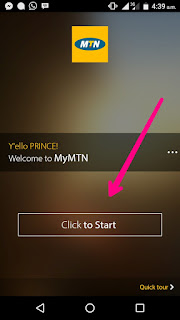
  • It is simple and easy. Just download MTN official app called MyMTN by clicking here.
  • Then launch or open the application and Tap on Click To Start (you should login or create an account). As shown below;
    mymtn
  • Then tap on My Subscriptions. As shown below;
    mymtn
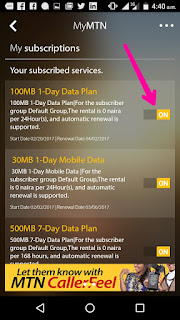
  • Then you would see the list of all the subscription plans that are active on your MTN line. Just Turn them off. As shown below;
    mymtn
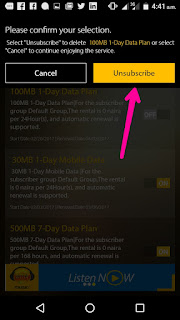
  • Then tap on Unsubscribe to finally unsubscribe from that particular data plan and you would receive a message saying "You have successfully unsubscribed". Enjoy!
    mymtn
By now, you would have been free from any MTN data autorenewal that has been removing money from your account and can now recharge your MTN line in peace.


Is it helpful? Drop Your Comments!
Read More
  • Share This:  
  •  Facebook
  •  Twitter
  •  Google+
  •  Stumble
  •  Digg

Monday, 6 March 2017

New Way To Browse With WhatsApp Bundle On Psiphon VPN

 Abdul     March 06, 2017     mtn     5 comments   

Surfing the internet with WhatsApp Bundle data, is what some people are hoping for, especially when the whatsapp data is too much. Sometimes, you might have alot of whatsapp data which is only officially designed to access WhatsApp application and can be boring at times to only be chatting.

Your next thinking will be on how to use the WhatsApp data to power all your applications or Surf the internet particularly, when the WhatsApp data is getting near to its expiring date. Hmmm I got your mind!

So you can now use your WhatsApp data on Psiphon VPN in order to power all Apps and surf the internet. Meanwhile, this tutorial is only for MTN users, who want to use their WhatsApp data. So let's go

How Can I Subscribe For MTN WhatsApp Data?

You can subscribe easily with a USSD code by dialing *662*3# and go ahead to choose any WhatsApp data plan from the options. As shown below;
whatsapp data

After Subscription or if you have subscribed to a WhatsApp data bundle before, you can now go for the Psiphon settings below.

How To Power All Apps Or Browse With MTN WhatsApp data bundle

  • Firstly,, launch or open Your Psiphon and apply these settings below; 


Set your apn to default
Then on the homepage of Psiphon;
Mark Remove port
Proxy type - Real host
Proxy server - cdn.whatsapp.net or whatsapp.com
Real proxy type - Default
Real proxy port - 8080 or 80
psiphon vpn


  • Then finally, go back and Tap on START connect.
    psiphon
     
So that's all! You can now enjoy your WhatsApp data on Psiphon VPN.

Is it helpful? Do you encounter any problems or issues while trying to use WhatsApp data bundle on Psiphon VPN, kindly ask more questions and if it works for you, kindly share your experience!
Read More
  • Share This:  
  •  Facebook
  •  Twitter
  •  Google+
  •  Stumble
  •  Digg

Saturday, 4 March 2017

MTN Now Compensating Customers With Free 100MB

 Abdul     March 04, 2017     mtn, network     No comments   

MTN, the giant telecommunication company had some network issues for some weeks now and this lead to the inability to recharge your MTN network with any voucher or recharge card that starts with 4 or 5.

MTN is now fully back again as they have reinstate their network which means all MTN users can now browse, call and use their 4G LTE network without any problem.

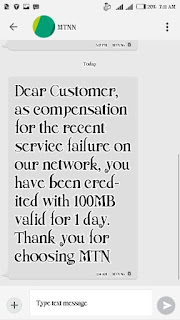
So MTN is now compensating some of its users with free 100MB. The message for the free 100MB goes like this below;

"Dear customer, as compensation for the recent service failure on our network, you have been credited with 100MB valid for 1day. Thank you for choosing MTN."
As shown below;
mtn
You can browse and download with it because is just like a Normal data plan. You can also check your data balance by dialing *559# and enjoy!


Is it helpful? have you received Yours?
Read More
  • Share This:  
  •  Facebook
  •  Twitter
  •  Google+
  •  Stumble
  •  Digg

Thursday, 23 February 2017

How To Activate MTN 4G LTE For Smartphones Including iPhone

 Abdul     February 23, 2017     mtn, phone     No comments   

Are you having problems activating your MTN 4G LTE or switching to 4G LTE network from your MTN? This article will surely help you on how to go about it.

As we all know that MTN 4G LTE (long term evolution) is one of the fastest means to improve your internet experience. Meanwhile, the use of 4G LTE network isn't that popular in Nigeria but just to boost data and internet productivity. So let's see how to know and activate MTN 4G LTE network.


How To Know If Your Smartphone Is Compatible With MTN 4G LTE Network And To Activate It

It is very easy and simple because MTN had made it easier to confirm, if your smartphone supports 4G LTE network.

  •  Firstly, your phone must support or run on Band 7 (2600mHz) and then send 4G to 131. Immediately, you will get a message saying " Yello! Your device is 4G ready but you need to upgrade your SIM to enjoy MTN 4G LTE...". As shown below;

  • If your Android or iPhone is supported, kindly go to the nearest MTN service Center nearest to you and request for a SIM swap to 4G compatible sim.
  • Wow! You can now insert your MTN swap sim, buy MTN 4G LTE Data plan and enjoy your experience with blazing 4G LTE!
s it helpful? Do you encounter any problems or issues while activating your MTN 4G LTE network? Kindly ask more questions and if it works for you, kindly share your experience!
Read More
  • Share This:  
  •  Facebook
  •  Twitter
  •  Google+
  •  Stumble
  •  Digg

How To Transfer Credit Or Airtime On Etisalat, MTN, Glo And Airtel Network

 Abdul     February 23, 2017     airtel, etisalat, glo, mtn, phone     5 comments   

Are you looking for a way to transfer credit or Airtime on Glo, Etisalat, MTN and Airtel networks? Yea! You can do that with just an easy step with the use of USSD code or through SMS messages as well. With the help of this tutorial, you will be able to transfer credit from Glo to Glo, MTN to MTN, Etisalat to Etisalat and Airtel to Airtel. So let's see how to transfer your credit or Airtime on all these popular networks in Nigeria.

How To Transfer Credit Or Airtime On All Networks In Nigeria


FOR ETISALAT NETWORK: It is very easy and simple. You just have to dial *223*Pin*Amount*Phone Number# and your credit will transfered successfully. You can also transfer credit on Etisalat by going to Etisalat Service Menu in your menu list. So after you have located it, just tap on Balance transfer and enter the default pin 0000 then enter the amount and send. You can also change your default pin in the service menu.

FOR AIRTEL NETWORK: It is easy and simple. You will need a transfer PIN which is the pin that should only be kept by you, otherwise,  people will be able to transfer your credits without your consent. So to change your transfer PIN, kindly send;

Pin Old Pin New Pin as SMS to 432 e.g Pin 1234 9090. Airtel default pin is 1234 to 432. So after you have successfully changed your pin to what you will remember, then you can now transfer your credit by sending 2U (space) Recipient’s phone number (space) Amount (space) Pin to 432 as a text message. E.g Example: 2U 08122903773 100 1234 to 432.

FOR GLO NETWORK: It is easy and simple. To transfer credit from one Glo sim to another, just dial *131*recipients phone number*Amount*Pin# then send. Example: *131*07053633719*100*12345# and after you filled it, it will tell you to press 1 to confirm and 2 to cancel. Default PIN is 00000.

You can change or create new Glo ME2U transfer pin, dial *132*00000*New Pin* New Pin# then send.

FOR MTN NETWORK - It is also easy and simple. Before you can transfer any credit on MTN network, you will have to create a secret pin which will only be known by only you in order for other people not to transfer your credits without your consent or permission.

To Change PIN on MTN: You can change your Transfer Pin via SMS or USSD code. For SMS, send Default PIN New PIN New PIN to 777 e.g 0000 1234 1234 to 777 and for USSD code, just dial *601* default/old PIN* New PIN* New PIN# e.g *601*0000*1234*1234# and if you enter it correctly, you will receive a message that your Pin has been changed successfully.

To Transfer Credit On MTN: You just have to send Recipient's number Amount Secret PIN to 777 as a text message e.g Transfer 08065655230 200 1234 and send it to 777  and to transfer credit on MTN using USSD, you just have to dial *600*Recipient’s phone number*amount in Naira*PIN# then press Send/Ok. If you enter it correctly, you will receive a message confirming successful transfer.

Is it helpful? Do you encounter any problems or issues while trying to transfer credit on MTN, GLO, Etisalat and Airtel, kindly ask more questions and if it works for you, kindly share your experience!
Read More
  • Share This:  
  •  Facebook
  •  Twitter
  •  Google+
  •  Stumble
  •  Digg

Wednesday, 22 February 2017

Take Action Before MTN 100MB And More Starts Their Credit Deduction!

 Abdul     February 22, 2017     mtn, phone     No comments   

Not long ago, MTN had some problems with their system and thousands of Nigerians was able to get into their system to accumulate hundreds of gigabytes but MTN discovered this trick because of some reports from snitchers and it got blocked.

MTN has start deducting back their data. As I have said earlier, everybody data will be deducted and you have to take action immediately before it penetrates into your normal account.


So if you are one of those that activated the MTN 100MB and more, you should quickly send NO113 to 131 as a text message. Or else, your credits will be deducted anytime you load.

Is it helpful? Was your data deducted? How many data were you able to accumulate before the deduction?

Read More
  • Share This:  
  •  Facebook
  •  Twitter
  •  Google+
  •  Stumble
  •  Digg

MTN Collect Call Service: Call Your Friends With Their Credits

 Abdul     February 22, 2017     mtn, phone     No comments   

Do you know that you can call your friends or families with zero naira by using their credit for the call? Yea! MTN introduced Collect Call Service that will allow you accomplish the mission without any hindrances. Meanwhile, the person that will receive the call, will have to accept to pay for the incoming voice call.


Benefits Of MTN Collect Call Service


  • You will be able to call your friends and families with a zero credit.

    • You won't be charged a connection fee or a subscription fee for using the service.


    How MTN Collect Call Service Works


  • You just have to dial *121*Your friend number# e.g *121*08130000000# and the system will check if your friend has the minimum Airtime required, If you are in the allowed tariff plan, if your friend is in the allowed tariff plan, If your friend is available on the network and while the system is checking all this conditions, you will hear; "Call in progress. Please wait while your call is being connected.".

    • So after the system has confirmed all these conditions, the system will tell your friend that "Welcome to MTN Collect call service. Press 1 to accept, 2 to reject, 3 to accept and add to white list, 4 to reject and add to black list."
    • If he or she press 1 to accept, you will be connected but if your friend press other options, it will disconnect and say; "Sorry, the call cannot be connected at the moment. Please try again later. Thank you!".
    • So call and enjoy with zero credit.

    Is it helpful? Do you encounter any problems or issues while trying to set this up kindly ask more questions and if it works for you kindly share your experience!
    Read More
    • Share This:  
    •  Facebook
    •  Twitter
    •  Google+
    •  Stumble
    •  Digg
    Older Posts Home

    Popular Posts

    • Upgrade Your Tecno Y4 To 6.0 Marshmallow Using Mystic OS V7 Custom ROM
      Do you know that you can upgrade your  Tecno Y4  to 6.0 Marshmallow? Yea! You can do that easily with this tutorial and by installing  Mysti...
    • How To Activate BB Plan Of 3GB For 1,000Naira On Android Device
      Airtel has joined the best network that offers cheaper data plans even on BlackBerry phone because it refused to join other networks like Et...
    • FIFA 14 v1.3.6 Mod Apk + Obb Data [No Root] Download, Install And Play [Fully Unlock]
      EA Sport Android FIFA 14 has been the best Android football HD game so far due to its HD graphics, realness, offline feature to enjoy manage...
    • OnePlus 5T ‘Star Wars Edition’ Has Been Launched In India
      A month after the dispatch of the OnePlus 5T , OnePlus indeed took the middle stage to report the dispatch of the new Star Wars-enlivened...
    • How To Transfer Credit Or Airtime On Etisalat, MTN, Glo And Airtel Network
      Are you looking for a way to transfer credit or Airtime on  Glo, Etisalat, MTN  and  Airtel  networks? Yea! You can do that with just an eas...

    Categories

    airtel android apple apps blogging Browsing cheats computer etisalat games glo google pixel Hacks How To infinix internet internet & data internet data ios mod mtn network oneplus oneplus 5t oneplus5t star wars oreo pc phone premium accounts Ram Roms samsung star wars tecno telegram tweakware wallpapers Web tutorials whatsapp

    Newsletter

    Subscribe Our Newsletter

    Enter your email address below to subscribe to our AbdulTech newsletter.

    About Us

    AbdulTech

    Vanice is modern magazine blogger template which focuses on lifestyle news, health, and entertainment.

    Pages

    • Home
    • About Us
    • Disclaimer
    • Sponsor A Post
    • Contact Us
    • Write For Us
    • Advertise With US

    Blog Archive

    • ▼  2019 (1)
      • ▼  January (1)
        • Download Brawl Stars APK Latest December Update
    • ►  2018 (12)
      • ►  December (1)
      • ►  October (4)
      • ►  August (3)
      • ►  June (1)
      • ►  April (3)
    • ►  2017 (173)
      • ►  December (3)
      • ►  August (3)
      • ►  July (8)
      • ►  June (6)
      • ►  May (7)
      • ►  April (40)
      • ►  March (49)
      • ►  February (57)

    Copyright © AbdulTech | Powered by Blogger
    Design by Hardeep Asrani | Blogger Theme by NewBloggerThemes.com | Distributed By Gooyaabi Templates