AbdulTech
  • Home
  • Business
    • Internet
    • Market
    • Stock
  • Downloads
    • Dvd
    • Games
    • Software
      • Office
  • Parent Category
    • Child Category 1
      • Sub Child Category 1
      • Sub Child Category 2
      • Sub Child Category 3
    • Child Category 2
    • Child Category 3
    • Child Category 4
  • Featured
  • Health
    • Childcare
    • Doctors
  • Uncategorized
Showing posts with label whatsapp. Show all posts

Sunday, 18 June 2017

The New Features Of WhatsApp On iOS Devices ( Coming Soon To Android )

 Abdul     June 18, 2017     whatsapp     No comments   

The latest iOS version of  WhatsApp now adds camera filters,  photo albums, and a new quick reply feature that allows users to respond to messages in a thread. With it's new features, WhatsApp now makes it easier to organize photos, customize images, and handle messages.


Introducing WhatsApp Albums


Upon sending or receiving multiple photos or videos (more than four) in WhatsApp for iOS, the new app version will automatically bundle them together as an album. If there are multiple images, they will appear with a plus sign that allows users to view all media. Tapping on the album will display all items.

Introducing Whatsapp Filters


With the latest update, WhatsApp users on iOS can also add filters to their photos, videos, or GIFs. Users who take a new photo or video, or simply choose to upload some media stored on their device, will have five filter options: black and white, pop, chrome, cool, and film.

Check Out The Latest IOS Version Of Whatsapp That Comes With Awesome Features

Introducing WhatsApp Quick Reply

The new update also introduces a new reply shortcut feature that allows users to quickly reply to messages. To do so, just swipe right on any message in a thread and start typing the reply, which will appear at the bottom of the chat window. This makes things easier, faster, and more convenient, although it’s not a major new feature. It should prove particularly valuable in group chats with a lot of messages, where a message or a question might get drowned in other messages before it receives a reply.

The new features are currently available only for the iOS version of  WhatsApp, but we Android users should get the same later on. No details are available yet,  however,  regarding when the Android version of WhatsApp will get the update.

Whatsapp is one of the most popular messaging apps in the world, although it’s got some heavy competition and there’s no shortage of messaging apps on the market. The new photo-related features could help the app gain more traction with youngsters, as photos are becoming an increasingly important part of today’s conversations. The photo albums could be useful to all users, but the new filters seem particularly targeted at younger users hooked on the trend to spice up their photos and videos.

The latest iOS update brings WhatsApp closer to Instagram. Both WhatsApp and Instagram are under Facebook’s umbrella.

If you are using iOS device, then you can dowsnload the latest whatsapp Here

Is it helpful? What do you think about the new features of whatsapp?
Read More
  • Share This:  
  •  Facebook
  •  Twitter
  •  Google+
  •  Stumble
  •  Digg

Tuesday, 2 May 2017

How To Pin a Chat On WhatsApp

 Abdul     May 02, 2017     How To, whatsapp     No comments   

How To Pin a Chat On WhatsApp
How to pin a chat

The truth is WhatsApp keeps getting better by the day. The latest feature to grace the world’s most popular IM app is the addition of features that allows you Pin up to 3 chats to the top just as we have in some online forums.
The ability to Pin chats on whatsapp will be a great aspect of the social app especially for those of us that have numerous number of conversations from so many people. Things can get clustered thereby making it a bit hard or time consuming to search for your favorite chats but with this latest update, you can simply Pin your favorite chats at the top.
However, this new feature is only available on theWhatsApp beta version 2.17.162(and now 163). In other words, you won’t be able to access it on the regular whatsapp application as of the time of writing this post except you are using WhatsApp Beta.
HOW TO PIN A CHAT
  • Download latest WhatsApp beta 2.17.163
  • Install it on your Android device and run it
  • Tap and hold on any chat and you’ll get a new pin icon in the action bar next to the delete, mute, and archive functions.

For now, only 3 chats can be pinned after you which get a small toast notification message saying you can’t pin more.
We hope it becomes available on the regular app sooner than expected.
Read More
  • Share This:  
  •  Facebook
  •  Twitter
  •  Google+
  •  Stumble
  •  Digg

Monday, 17 April 2017

How To Share Any Apk Files Through Whatsapp

 Abdul     April 17, 2017     apps, whatsapp     1 comment   

WhatsApp which is one of the best social medias with the most active daily users has not yet released the sharing feature for sending Apk files but only documents sharing are enabled for now. So, in this tutorial, you will be able to easily share any Apk files to your friends and neighbours.
In this method or concept, you will rename any Apk files to .txt files before sending and the receiver will rename it from .txt file format to Apk file format before install. So, let's go on.

  • Don't Miss: 21 Google Search Hacks That Will Change Your Life 

How To Share Any Apk Files On WhatsApp

As a sender


  • Firstly, open your WhatsApp application and go to the person's private message to send the Apk files or in a WhatsApp group (it depend on your choice).
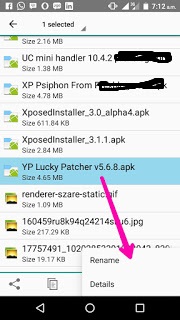
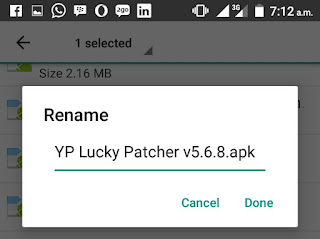
  • Then, open your phone file manager and locate the Apk file you want to send then, hold to bring the options for RENAME. You can now rename the .apk to .txt and press OK. As shown below;
    share apk files through whatsapp  

    share apk files through whatsapp 
    Then go back to your WhatsApp application and go to the person's profile then tap on the Sharing icon and tap on Document. Now, locate the renamed file and send.
Now As a receiver:


  • Open your WhatsApp application and download the shared Apk application.
  • Then, goto your phone file manager and locate the shared Apk file and hold it to bring out options to RENAME the app from .txt to .apk and immediately, you can now tap it to install.
 
  • Wow! That's all.


This is best method to share any Apk file on WhatsApp application before they decides to add the sharing of app features on their app.

Is it helpful? Do you encounter any problems or issues while trying to set this up, kindly ask more questions and if it works for you, kindly share your experience! 
Read More
  • Share This:  
  •  Facebook
  •  Twitter
  •  Google+
  •  Stumble
  •  Digg

Wednesday, 22 February 2017

Express Yourself With New WhatsApp Status, Checkout!

 Abdul     February 22, 2017     phone, whatsapp     No comments   

WhatsApp has now successfully launched WhatsApp Status, a feature copied from Snapchat. With this new feature, you will be able to express yourself with a short video, image or gif.


This new WhatsApp feature will enable or allow users to share photos, videos, and GIFs as your status (stories) which will automatically disappear or vanish in 24hours and will be encrypted end-to-end. Meanwhile, this new WhatsApp Status was rolled out to WhatsApp beta tester last year, November.

Below is the statement from WhatsApp official blog concerning this feature;
"We are excited to announce that, coinciding with WhatsApp's 8th birthday on February 24, we are reinventing the status feature. Starting today, we are rolling out an update to status, which allows you to share photos and videos with your friends and contacts on WhatsApp in an easy and secure way. Yes, even your status updates are end-to-end encrypted."


Once you are using this feature fully, you will be able to control who sees your statuses. However, this feature will start rolling out for all android and iOS users starting from Netherlands and France. Meanwhile, Facebook is now testing stories section in their mobile app.

Is it helpful? What do you have to say about this latest WhatsApp status feature?
Read More
  • Share This:  
  •  Facebook
  •  Twitter
  •  Google+
  •  Stumble
  •  Digg
Older Posts Home

Popular Posts

  • Upgrade Your Tecno Y4 To 6.0 Marshmallow Using Mystic OS V7 Custom ROM
    Do you know that you can upgrade your  Tecno Y4  to 6.0 Marshmallow? Yea! You can do that easily with this tutorial and by installing  Mysti...
  • How To Activate BB Plan Of 3GB For 1,000Naira On Android Device
    Airtel has joined the best network that offers cheaper data plans even on BlackBerry phone because it refused to join other networks like Et...
  • FIFA 14 v1.3.6 Mod Apk + Obb Data [No Root] Download, Install And Play [Fully Unlock]
    EA Sport Android FIFA 14 has been the best Android football HD game so far due to its HD graphics, realness, offline feature to enjoy manage...
  • OnePlus 5T ‘Star Wars Edition’ Has Been Launched In India
    A month after the dispatch of the OnePlus 5T , OnePlus indeed took the middle stage to report the dispatch of the new Star Wars-enlivened...
  • How To Transfer Credit Or Airtime On Etisalat, MTN, Glo And Airtel Network
    Are you looking for a way to transfer credit or Airtime on  Glo, Etisalat, MTN  and  Airtel  networks? Yea! You can do that with just an eas...

Categories

airtel android apple apps blogging Browsing cheats computer etisalat games glo google pixel Hacks How To infinix internet internet & data internet data ios mod mtn network oneplus oneplus 5t oneplus5t star wars oreo pc phone premium accounts Ram Roms samsung star wars tecno telegram tweakware wallpapers Web tutorials whatsapp

Newsletter

Subscribe Our Newsletter

Enter your email address below to subscribe to our AbdulTech newsletter.

About Us

AbdulTech

Vanice is modern magazine blogger template which focuses on lifestyle news, health, and entertainment.

Pages

  • Home
  • About Us
  • Disclaimer
  • Sponsor A Post
  • Contact Us
  • Write For Us
  • Advertise With US

Blog Archive

  • ▼  2019 (1)
    • ▼  January (1)
      • Download Brawl Stars APK Latest December Update
  • ►  2018 (12)
    • ►  December (1)
    • ►  October (4)
    • ►  August (3)
    • ►  June (1)
    • ►  April (3)
  • ►  2017 (173)
    • ►  December (3)
    • ►  August (3)
    • ►  July (8)
    • ►  June (6)
    • ►  May (7)
    • ►  April (40)
    • ►  March (49)
    • ►  February (57)

Copyright © AbdulTech | Powered by Blogger
Design by Hardeep Asrani | Blogger Theme by NewBloggerThemes.com | Distributed By Gooyaabi Templates