AbdulTech
  • Home
  • Business
    • Internet
    • Market
    • Stock
  • Downloads
    • Dvd
    • Games
    • Software
      • Office
  • Parent Category
    • Child Category 1
      • Sub Child Category 1
      • Sub Child Category 2
      • Sub Child Category 3
    • Child Category 2
    • Child Category 3
    • Child Category 4
  • Featured
  • Health
    • Childcare
    • Doctors
  • Uncategorized

Sunday, 16 April 2017

WhatsApp Brings Ability To Revoke Sent Messages In Beta, Checkout!

 Abdul     April 16, 2017     apps     No comments   

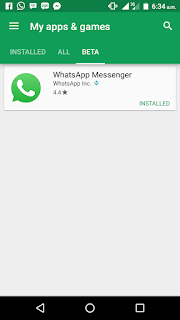
WhatsApp are really working hard to release more wonderful features into their App and not long ago, a feature that allows users to revoke or delete sent message after 5minutes was seen in their Beta update. The revoke feature update arrives on WhatsApp Web 0.2.4077 and this feature is turned off as default in settings, users have to enable it before use.

whatsapp

Not only that, there is another feature or update available on beta v2.17.148. Is a new pop up menu that appears above the text field with different shortcut buttons. Upon selecting text, beta users now sees a formatting shortcuts such as Bold, Italic, Monospace, and Strikethrough. Android 7.0 + users will also see Translate, if only is installed on their smartphone.

These are the beautiful update that appeared on WhatsApp beta and if you wish to become a beta tester, just click here and sign up. You will be able to test upcoming features of WhatsApp. However, these beta features of WhatsApp will be coming soon for the public.

What do you have to say about the revoked feature and formatting shortcuts of WhatsApp Beta? 
Read More
  • Share This:  
  •  Facebook
  •  Twitter
  •  Google+
  •  Stumble
  •  Digg

Nokia 6 Gets And Receives Android 7.1.1 Nougat Update

 Abdul     April 16, 2017     phone     No comments   

Wow! The new smartphone from Nokia named Nokia 6 now receives the latest Android operating system 7.1.1 Nougat update. The Nokia 6 Nougat update comes after the update of Infinix Note 3 and has many amazing features that will fix the bugs of your smartphone.

nokia 6 Nougat update

The Nokia 6 is designed of metal and is compatible with 4G LTE network. It comes with non-removable Li-Ion 3000 mAh battery with fast charging feature and supports 16MP rear or back camera with LED flash and 8MP front-facing camera with LED flash. It cost about 80,000naira or above depending on your area. You can view more of its specifications by clicking here.

  • Don't Miss: New Latest Working And Valid IMEI For MTN Double Data
Features Of Nokia 6 Android 7.1.1 Nougat Update


  • It brings Android 7.1.1 update (latest security patch).
  • It enhance power saving and background management.
  • Update Google security patch.
  • It update version of preload application.
  • Supports 4G/3G Dual sim Dual standby
  • Update Nokia USB driver
  • It has data size of 369MB for update.


How To Update Your Nokia 6 To Android 7.1.1 Nougat

Before you proceed, unroot your smartphone and make sure your phone is charged.


  1. Go to Settings.
  2. Tap on About phone.
  3. Tap on System update.
  4. Now, tap on update.


So, that's how to upgrade your Nokia 6 to latest Android operating system (OS).
  •   Don't Miss: Checkout Nokia 6 Specifications, Features And Price
Is it helpful? Do you encounter any issues or problems while trying to upgrade, kindly ask more questions and if it works for you, kindly share your experience!
Read More
  • Share This:  
  •  Facebook
  •  Twitter
  •  Google+
  •  Stumble
  •  Digg

New Latest Working And Valid IMEI For MTN Double Data

 Abdul     April 16, 2017     internet & data, mtn     3 comments   

I know that most of us are familiar with this offer and some of us are already enjoying it as well because MTN officially launched this offer since last year 2016 and it's a way to double it's users data plan. If you purchase any MTN official data plans, it will be doubled immediately and this has helped many users using MTN especially those who just purchased a new smartphone because they will be given this offer by using a special code.


MTN double data

What of those who have no time or sufficient money to buy a brand new smartphone? Yea! You can get the offer luckily from your message or alternatively, by tweaking a valid IMEI from an eligible smartphone.

MTN 100% double data bonus is still working perfectly, same with the 20% double data bonus offer. These valid IMEIs are always generated from an eligible or supported smartphone in order for those who are not eligible to also enjoy the offer for a period of 6 months.

So, if you are among those who have not gotten this offer, you can follow us along as we unveil the details and it's procedure. Let's go.
  • Don't Miss: How To Get Free Airtime To Subscribe And Call Using Raadaa 
Latest And Current Working IMEI For MTN Double Data


  • Tecno Y2 IMEI number - 35166408564**** 
  • Infinix Note 2 Lite IMEI number - 35455407227****
  • HG-M66 QINDAO HAIER IMEI number - 35660201757****


Just Analyze the remaining four (4) digit numbers, insert your old or new MTN sim into your Android smartphone and Tweak the IMEI number. Once your tweaking is successful, you will receive a message instantly or later, saying; "Congratulations! Your smartphone has been activated to enjoy DOUBLE on any data bundle you buy for the next 6months.".

Now, dial *131*1# to buy any MTN data plan and it will be doubled immediately which means you will be given 100% double data on that purchased data plan. Always dial *131*4# to check your data balance.

Is it helpful? Do you encounter any problems or issues while trying to activate this, kindly ask more questions and if it works for you, kindly share your experience! 
Read More
  • Share This:  
  •  Facebook
  •  Twitter
  •  Google+
  •  Stumble
  •  Digg

Saturday, 15 April 2017

How To Get Free Airtime To Subscribe And Call Using Raadaa

 Abdul     April 15, 2017     How To, phone     1 comment   

In this current economic situation of Nigeria and other countries, everyone must make money to pay the tax of their subscription fees for the internet because almost everything is now made of Technology and is advancing everyday with high consumption of internet data. So, AbdulTech provides browsing solutions to solve or reduce the way people purchase data for Internet purposes and that’s why you have to always stay updated.
There is now a mobile site called Raadaa that the main purpose is to share and monetize contents for individuals, organizations and authors including newspapers, articles, research papers, blogs and many other things. So if you are an author, you can always share your content and earn revenue in this platform by sharing your contents for people to read for free.
However, any user can make free 50naira on users they bring to the website or any user that registered though their referrals link. It is easy and simple to REDEEM your money as a recharge card.
Features And Benefits Of Raadaa
  • The earned money will always be paid to your network as a recharge card.
  • It can be used to make calls and call friends with families.
  • The recharged money can be used for subscription of data plans.
  • It is a normal credit.
  • It is easy and simple to handle.
How To Join Raadaa To Make Money For Subscription Of Data And Others
  • Firstly, visit Raadaa by Clicking here.
  • Then sign up and a verification mail will be sent to your email, just go to your email and tap on the link to verify.
  • After that, login your Raadaa account and Tap on BECOME AN AGENT to open where you will get your referrals link.
  • So, copy the referrals link and share to friends and families on social  medias to earn money.

raadaa
Note: One person referred gives you Free 50naira. So keep sharing till you get more than that.
Is it helpful? Do you encounter any issues or problems while trying to set this up, kindly ask more questions and if it works for you, kindly share your experience!
Read More
  • Share This:  
  •  Facebook
  •  Twitter
  •  Google+
  •  Stumble
  •  Digg

Friday, 14 April 2017

Download Tweakware VPN Version 6.1 For Etisalat And Glo Free Unlimited Browsing

 Abdul     April 14, 2017     Browsing cheats     No comments   

To all those using the Etisalat or Glo free browsing, TweakWare version 6.1 has been released and it fixes Etisalat 0.0k and Glo 0.0k not connecting issue that most users face.The setup for the Glo and Etisalat tweak is still the same. For those who are new to this, just follow the instructions below.
tweakware 6.1

How to Configure The TweakWare VPN Version 6

Configuring the TweakWare VPN app is very easy and straightforward.
Click here to update your Tweakware VPN to the latest version
  • First, make sure you use your default APN settings for either the Etisalat or Glo tweak.
  • If you don’t have the TweakWare app, Get it on playstore.
  • Click on the server list and select any of the available servers (If you don’t have a premium account, make sure you select only from the Free servers).
  • Click on the tweak list and select either Glo 0.0k, Eti 0.0k or Eti Chatpack 2017, depending on the one you want to use.
  • After that just click on connect and wait a few seconds for it to connect.

How to Configure TweakWare VPN With the Etisalat Chatpack Tweak

If you have a poor Glo network in your location and the etisalat 60mb/day tweak is not okay for you then you can try out the Chatpack tweak.
  • Make sure you have at least N150 on your Etisalat sim.
  • Dial *200*3*3*1*2*1#
  • You will get a confirmation message that you have subscribed for the Chatpack bundle.
  • You can dial *343*5*0# if you don’t want auto renewal of the plan.
  • After that just launch your TweakWare VPN and select Eti ChatPack I or Eti ChatPack II.
  • Choose any of the free servers or premium servers (if you have TweakWare subscription) then connect.
tweakware 6.1

Note: The Chatpack tweak is actually limited to about1.5gb to 3GB.
That’s all guys,

If  this post is helpful or you have any question, feel free to ask and also don’t forget to kindly share this post.
Read More
  • Share This:  
  •  Facebook
  •  Twitter
  •  Google+
  •  Stumble
  •  Digg

How To Change your profile on Blogger

 Abdul     April 14, 2017     blogging, How To, Web tutorials     No comments   

You can share info about yourself with your readers with your Blogger or Google+ profile.
blogger

Choose your profile

You can use your Google+ profile or create a Blogger-specific profile:
  1. Sign in to Blogger.
  2. In the left menu, click Settings and then User settings.
  3. Under “General,” next to “User Profile,” choose a profile type:
    • Blogger
    • Google+
  4. In the top right, click Save settings.
Note: You can only use one profile for all blogs you contribute to.

Use a Blogger-specific profile

  1. Sign in to Blogger.
  2. In the left menu, click Settings and then User settings.
  3. Under “General,” next to “User Profile,” choose “Blogger.”
  4. In the top right, click Save settings.

Edit your Blogger profile

  1. Sign in to Blogger.
  2. In the left menu, click Settings and then User settings.
  3. Under “General,” next to “User Profile” and under “Blogger,” click Edit.
  4. Make your changes.
  5. Click Save Profile.

Show your profile on your blog

  1. Sign in to Blogger.
  2. In the top left, next to the name of your blog, click the Down arrow Down Arrow.
  3. Choose the blog to update.
  4. In the left menu, click Layout.
  5. Choose where on the page you want to show your profile and click Add a gadget.
  6. Choose a profile gadget:
    • The Google+ Badge gadget will display your Google+ profile.
    • The Profile gadget will show either your Blogger profile or Google+ profile, depending on which profile you’ve selected to contribute to blogs.
  7. Next to the one you want, click Add Add.
  8. Choose your settings.
  9. Click Save.
  10. In the top right, click Save arrangement.
Is it helpful? What do you think?
Read More
  • Share This:  
  •  Facebook
  •  Twitter
  •  Google+
  •  Stumble
  •  Digg

How to Add Pages To Blogger

 Abdul     April 14, 2017     blogging     2 comments   

You can create pages for consistent content like “About” or “Contact.” Pages can appear on your blog as tabs at the top or links on the side.
Note: You cannot use specific posts as pages.
blogger

Add pages

1. Show your pages

  1. Sign in to Blogger.
  2. Select the blog to update.
  3. In the left menu, click Layout.
  4. In the section you want your pages to show, click Add a Gadget.
  5. In the window that appears, next to Pages, click Add .
  6. Set your settings and click Save.
  7. At the top right, click Save arrangement.
To change where your pages will appear, drag the gadget to its new location.

2. Create, edit, or delete pages

  1. Sign in to Blogger.
  2. Select the blog to update.
  3. In the left menu, select Pages.
  4. Click New page.
  5. Add a page title and other information.
  6. Click Save, Preview, or Publish.

To edit a page:

  1. Follow steps 1 and 2 above.
  2. Under the page you want to edit, click Edit.
  3. Make updates to your page.
  4. Click Save, Preview, or Publish.

To delete a page:

In Pages, under the page you want to remove, click Delete > OK.

3. Select the pages to show

  1. In the left menu, click Layout.
  2. In the “Pages” section, click Edit Edit.
  3. Select the pages you wish to show.
  4. Click Save.
  5. At the top right, click Save arrangement.
There is no limit to the number of pages you can have on one blog.
4. Create a page that links to another website
  1. From the Blogger dashboard, click the blog you want to update.
  2. In the left menu, click Layout.
  3. In the "Pages" section, click Edit Edit.
  4. In the window that appears, click Add external link.
  5. Add the page title and URL.
  6. Click Save Link.

To delete a page:

  1. Follow steps 1–3 above.
  2. In the page to delete, click Remove .
Is it helpful? What do you have to say?
Read More
  • Share This:  
  •  Facebook
  •  Twitter
  •  Google+
  •  Stumble
  •  Digg

New Ntel 4G LTE Data Plans, Price And Validity Period For Smartphones

 Abdul     April 14, 2017     internet & data     No comments   

Ntel is one of the popular 4G LTE operators in Nigeria and has released another new set of data plans for their users with new Tariffs as well. It is close to a year that Ntel officially launched their service in Nigeria Telecom market which is currently available in five (5) or more states in Nigeria; Lagos, Port-Harcourt, Abuja, Kaduna and some locations in sokoto.


ntel
Yea! These new set of data plans comprises of unlimited 2-Day, weekly and monthly data plans for your smartphone. They can be used to browse the Internet at a very high speed. So let’s see the new added plans below.
Ntel Latest Unlimited 4G LTE Data Plans And Tariffs
1. Smartphone Unlimited Lite: To enjoy high-speed Internet access on your mobile phone, you can subscribe for this new plan from Ntel which valid for 2 days and can be subscribed up from 1,000naira to 1,500naira. It is not data capped.
2. Smartphone Unlimited Weekly: To enjoy high-speed Internet access on your mobile phone, you can subscribe for this new plan from Ntel which valid for 7 days and can be subscribed up from 3,000naira to 3,750naira. It is not data capped.
3. Smartphone Unlimited Monthly: To enjoy high-speed Internet access on your mobile phone, you can subscribe for this new plan from Ntel which valid for 30 days and can be subscribed up from 10,000naira to 12,500naira. It is not data capped.
These are three wonderful new set of data plans released by Ntel to their smartphone users and the weekly, monthly and daily plans are combination of data and voice Tariffs which runs parallel to the unlimited plan. However, fair policy usage stated that, any subscriber who used a total volume of 3GB will be slowed down to 512mpbs immediately.

But i think this data is 99% Good2 out of 10
Enjoy....
What do you have to say about this? What’s your experience with Ntel network?
Read More
  • Share This:  
  •  Facebook
  •  Twitter
  •  Google+
  •  Stumble
  •  Digg

How To Upgrade Your Smartphone To New Version

 Abdul     April 14, 2017     computer, phone     1 comment   

Upgrading a smartphone to new version is one of the best things a phone user will want to perform in his or her mobile phone because it adds more features and fix some bugs. Android, iOS and other phone brands do provide updates for their operating system (OS) or sometimes, normal update to fix bugs and some other related issues that might render their users phone useless.
So, you can now learn how to upgrade your smartphone to a new version using this tutorial. It is very and simple especially if your Android smartphone do receive OTA (over the air) updates. It is also better to know if your phone has an update for your Android or iOS version or firmware. So let’s go on.
How To Upgrade Your Smartphone To New Version Of Operating System
  • Firstly, go to Settings on your Android smartphone.
  • Then scroll down to About Phone and tap it to select.
  • Then tap on System updates.
  • In the next page, tap on Check now to find any available update for your smartphone.
  • So if there is any, just tap on Upgrade and immediately, your phone will reboot and get updated successfully.

Note: Make sure you have the required data to perform the update and make sure you Unroot your smartphone before update to avoid bricking.
You can always update your phone using this method even on iPhone and other phones that supports OTA update. However, there are some smartphones that doesn’t support OTA update which can only be updated via flashing the update with PC. They are always discussed here on AbdulTech

Is it helpful? Do you encounter any problems or issues while trying to set this up, kindly ask more questions and if it works for you, kindly share your experience!
Read More
  • Share This:  
  •  Facebook
  •  Twitter
  •  Google+
  •  Stumble
  •  Digg

Thursday, 13 April 2017

MTN StartPack: Enjoy 500% Bonus On Every Recharges For 6Months

 Abdul     April 13, 2017     mtn, network     No comments   

Wow! MTN StartPack is a wonderful and special Tariff Plan that enables users enjoy Free extra 500% bonus on any of their recharges. The people who loves calling will definitely love this temporary Tariff Plan. It is only available for new MTN Sims.
It works when you recharge 100naira and above on your new registered MTN sim. Assuming, you recharged 100naira, you will get free 500naira added to the 100naira you recharged making 600naira. So, in every recharges, Free 500naira will always be added.
MTN startpack
It can be used to make calls, send SMS, browse the Internet and to get FREE 10MB in every recharges of 200naira & above with some other exciting offers.
  • Must Read: Infinix S2 Pro X522 Specifications, Features, Price

Benefits Of MTN StartPack Tariff Plan Offer
  • You get free 500% bonus on any recharges of 100naira above.
  • You get Free 10MB on every recharges of 200naira and above.
  • You can browse, call and send SMS to all networks in Nigeria with the credit.
  • You will also get some other exciting offers.
Features Of MTN StartPack Offer
  • It is only available to New MTN customers who just registered and activated their MTN sim.
  • The Free 500% bonus valids for 6months and will be received in a dedicated account.
  • The Airtime bonus valid for 7days and when recharged again, the validity period will be extended.
  • The Airtime bonus can be used to call, send SMS and browse all websites.
Note: This offer is only available to all new MTN users and once you migrate out from the Tariff Plan, you won’t be able to receive the offer anymore and each bonus lasts for 7days.
Is it helpful? What do you have to have to say about MTN StartPack Tariff Plan?
Read More
  • Share This:  
  •  Facebook
  •  Twitter
  •  Google+
  •  Stumble
  •  Digg
Newer Posts Older Posts Home

Popular Posts

  • Upgrade Your Tecno Y4 To 6.0 Marshmallow Using Mystic OS V7 Custom ROM
    Do you know that you can upgrade your  Tecno Y4  to 6.0 Marshmallow? Yea! You can do that easily with this tutorial and by installing  Mysti...
  • How To Activate BB Plan Of 3GB For 1,000Naira On Android Device
    Airtel has joined the best network that offers cheaper data plans even on BlackBerry phone because it refused to join other networks like Et...
  • FIFA 14 v1.3.6 Mod Apk + Obb Data [No Root] Download, Install And Play [Fully Unlock]
    EA Sport Android FIFA 14 has been the best Android football HD game so far due to its HD graphics, realness, offline feature to enjoy manage...
  • OnePlus 5T ‘Star Wars Edition’ Has Been Launched In India
    A month after the dispatch of the OnePlus 5T , OnePlus indeed took the middle stage to report the dispatch of the new Star Wars-enlivened...
  • How To Transfer Credit Or Airtime On Etisalat, MTN, Glo And Airtel Network
    Are you looking for a way to transfer credit or Airtime on  Glo, Etisalat, MTN  and  Airtel  networks? Yea! You can do that with just an eas...

Categories

airtel android apple apps blogging Browsing cheats computer etisalat games glo google pixel Hacks How To infinix internet internet & data internet data ios mod mtn network oneplus oneplus 5t oneplus5t star wars oreo pc phone premium accounts Ram Roms samsung star wars tecno telegram tweakware wallpapers Web tutorials whatsapp

Newsletter

Subscribe Our Newsletter

Enter your email address below to subscribe to our AbdulTech newsletter.

About Us

AbdulTech

Vanice is modern magazine blogger template which focuses on lifestyle news, health, and entertainment.

Pages

  • Home
  • About Us
  • Disclaimer
  • Sponsor A Post
  • Contact Us
  • Write For Us
  • Advertise With US

Blog Archive

  • ▼  2019 (1)
    • ▼  January (1)
      • Download Brawl Stars APK Latest December Update
  • ►  2018 (12)
    • ►  December (1)
    • ►  October (4)
    • ►  August (3)
    • ►  June (1)
    • ►  April (3)
  • ►  2017 (173)
    • ►  December (3)
    • ►  August (3)
    • ►  July (8)
    • ►  June (6)
    • ►  May (7)
    • ►  April (40)
    • ►  March (49)
    • ►  February (57)

Copyright © AbdulTech | Powered by Blogger
Design by Hardeep Asrani | Blogger Theme by NewBloggerThemes.com | Distributed By Gooyaabi Templates